


TL;DR: Several weeks into running Workforce Rewired, I realized I’d been making the collaboration harder than it needed to be. I hadn’t told Claude who I actually am. Not a bio, not a resume. Actually who I am. So I did, and the way I did it was more interesting than I expected. Here’s what happened, and how you can do it too.
The Thing Nobody Tells You About Working with AI
Everyone talks about prompts. The right question, the magic phrasing, the clever instruction that unlocks a better answer. There are newsletters dedicated to it. People sell courses on it. The word “prompt engineer” exists now and is said without irony in professional settings.
What they talk about less is context: the information you give an AI before the conversation even starts, the equivalent of handing a new colleague a briefing document before their first day. Without it, you’re starting from scratch every time. The AI doesn’t know if you’re a 22-year-old marketing intern or a 40-year-old executive. It doesn’t know how you think, what you care about, what you’d never say, or why any of this matters to you. It just knows the words you typed.
I launched Workforce Rewired several weeks ago and had been working with Claude since before that, building infrastructure, drafting research, setting up the daily briefing system that lands in my inbox every morning. The collaboration was working. But I kept noticing the distance between a first draft and something that actually sounded like me. I was spending real time correcting toward my own voice. That felt like a solvable problem.
What I built to solve it was a small folder of three documents I now think of as my “About Me” kit. And here’s the part that surprised me: I didn’t write them. Not exactly. I built them in conversation with Claude, through a process that turned out to be equal parts practical setup and unexpected self-inventory.
How It Actually Started
I didn’t open a blank document and write “here is who I am.” I opened a conversation and started answering questions.
Claude asked me about my professional background, not in the resume sense, but in the practitioner sense. What had I actually built? What problems had I solved that others hadn’t? What did I know from doing the work that someone reading about it wouldn’t know? I answered in the way you answer when someone is genuinely curious: loosely, in full sentences, with context and tangents. The AI listened, asked follow-ups, and started reflecting back a picture of my expertise that was more precise than anything I’d have written on my own on a first attempt.
Then it asked about how I write. Not what I write about, but how. What’s the difference between your voice at its best and generic writing in your field? Who do you admire as a communicator, and why? What words have you consciously removed from your vocabulary? I found myself thinking harder about these questions than I expected. It’s one thing to feel your own voice. It’s another to describe it to something with no intuition, no ear, no sense of what sounds right. That specificity turned out to be the point.
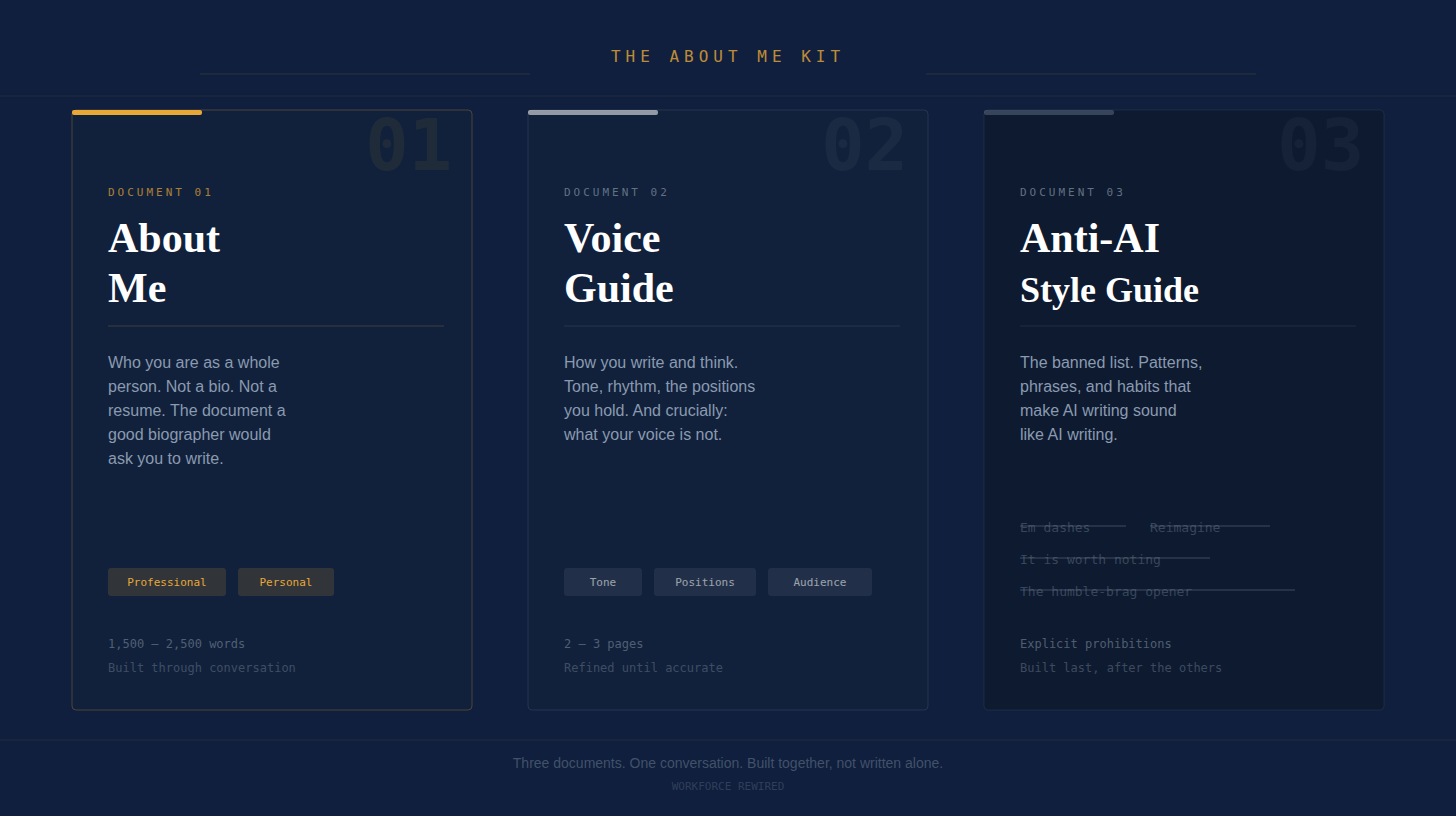
What I ended up with, at the end of those conversations, was three documents: an About Me, a Voice Guide, and an Anti-AI Style Guide. Not drafts I had written. Synthesized outputs the AI produced from our exchange, which I then reviewed, corrected, and refined until they were accurate. The process felt less like writing and more like being interviewed by someone who was also doing the transcription.
What’s in the Folder
The About Me is a narrative document about who I am as a whole person, professionally and personally. Where I came from, what I care about, what drives me, what I’ve lost, what I’ve built. Claude drew this out by asking the kinds of questions a good biographer asks: not just what you’ve done, but why it matters, and what it connects to. The resulting document covers my professional arc, the personal history that shapes how I think about institutions and policy, and the things I care about that have nothing to do with my job title. It reads like the document you’d want someone to read if they were going to spend the next year working closely with you.
The Voice Guide is a detailed description of how I write and think: my tone, my sentence rhythms, the intellectual positions I hold, the emotional register I aim for, who I’m writing for and why. It includes, critically, what my voice is not: what I’d never say, how I differ from the average person writing about HR and workforce strategy, the corporate language I’ve consciously edited out of my vocabulary. Claude produced the first version of this by synthesizing patterns from the conversation. I corrected it where it was wrong and sharpened it where it was vague.
The Anti-AI Style Guide is exactly what it sounds like: a specific list of the patterns, phrases, and structural habits that make AI writing sound like AI writing, with explicit instructions to avoid every one of them. Orphaned single-sentence paragraphs for false drama. The phrase “it’s worth noting.” Vague exhortations to “reimagine” things. The humble-brag opener. All banned. This one I co-wrote more actively, because identifying what I don’t want required me to articulate something I’d only previously felt as mild irritation when reading it.
Together, these three documents now travel with me into every Claude conversation I have for this project. They’re the briefing packet. The context layer. The thing that makes the difference between AI-assisted writing that sounds like me and AI-assisted writing that sounds like everyone else.
The Part I Didn’t Expect
Here’s what surprised me: the conversation required me to articulate things I hadn’t fully articulated before.
That’s not what I expected from a setup exercise. I expected to give an AI some facts about myself and get a useful reference document in return. What actually happened was more interesting. Because the questions were specific, and because I was answering them in order to produce something accurate rather than something impressive, I ended up saying things I hadn’t quite said before.
I had to name the intellectual positions I hold strongly, not just the topics I study. The things I genuinely believe about organizations, about global talent, about the entry-level career crisis that no one in my field is talking about directly enough. I had to say: this is what I think, not just what I research. That distinction, between what I study and what I’ve concluded, turned out to matter more than I expected.
The personal material was stranger still. The About Me document covers things I don’t typically put in professional contexts: my father dying when I was five, growing up on welfare and school lunch programs and what that means for how I think about institutions, the colleagues I’ve lost to cancer in my thirties, the sliding glass back door of my grandparents’ house in Paris, Tennessee always open. None of this belongs in a traditional professional bio. All of it belongs in any honest account of who I am and why I think the way I do.
What I found, in having to explain these things clearly enough for an AI to understand and reflect them back accurately, is that some connections I’d felt but never quite stated became stated. The process of building the context document was also, quietly, a process of integration.
I didn’t expect that. It was worth noting. (One last time, before I retire that phrase forever.)
How to Build Your Own
You don’t need to be launching a publication to do this. You might be using AI to help you think through a career transition, write more effectively at work, prepare for a negotiation, or just get better answers to better questions. In all of those cases, a small context folder will improve everything.
The key principle: don’t write the documents yourself first. Use the conversation to draw them out. Here’s the process.
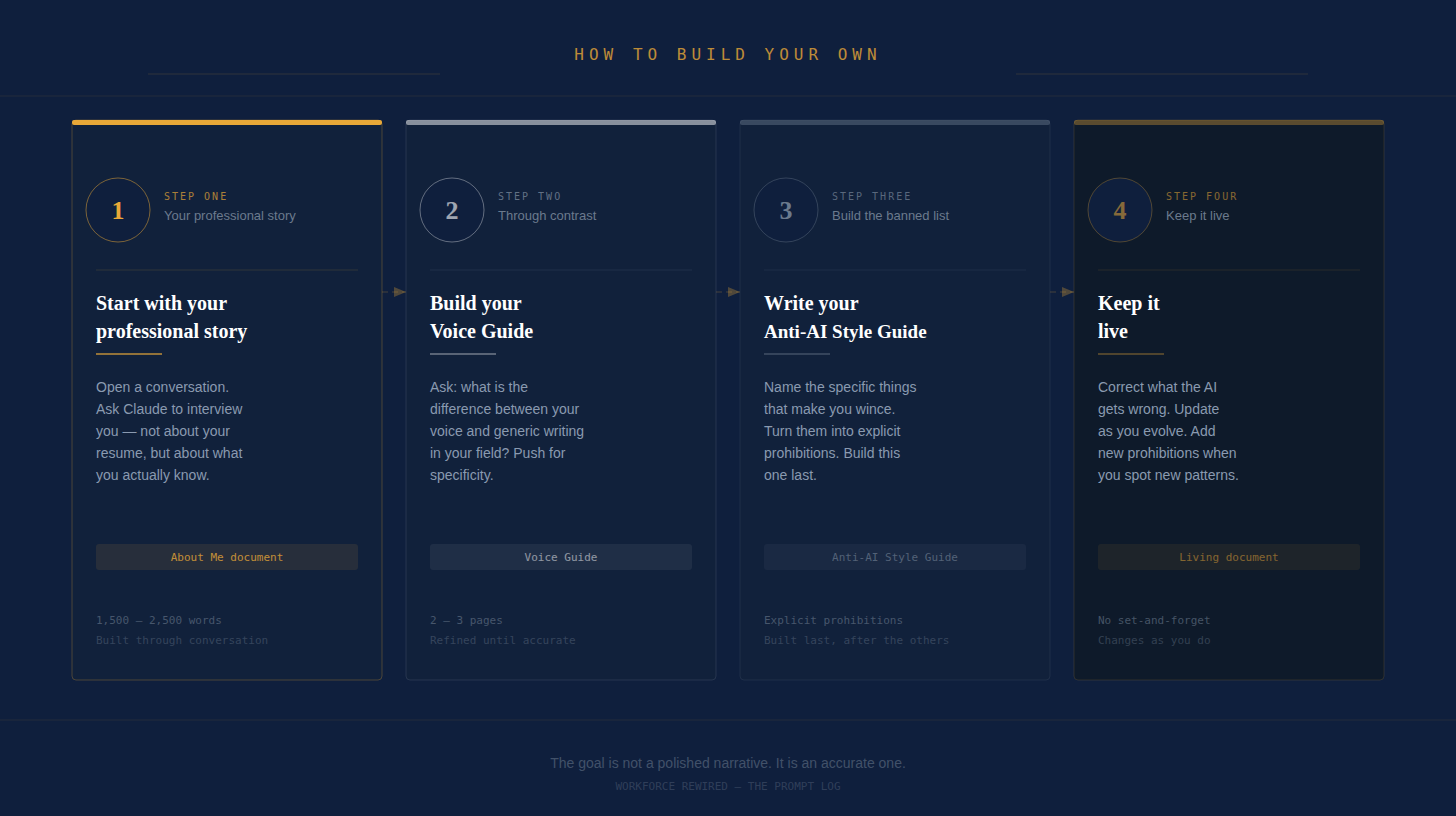
Step 1: Start with your professional story, but go deeper than the resume
Open a conversation with Claude and say something like: “I want to build a reference document about who I am professionally so you can work with me more effectively. Ask me the questions you’d need answered to understand not just my background, but how I think and what I actually know from experience.”
Then answer honestly. The AI will ask follow-up questions. Let it. The goal isn’t a polished narrative; it’s an accurate one. Correct it when it gets something wrong. Push back when it reflects something back too generically. The document that emerges from this process will be more precise than anything you’d write cold.
Step 2: Build your Voice Guide through examples and contrast
Ask Claude to help you articulate your writing voice. Useful prompts to get this started:
“What’s the difference between writing in my voice and generic writing in my field? Ask me questions to figure this out.”
“What words or phrases do I use that I’d want to avoid? Help me identify them.”
“Who do I sound like at my best, and who do I absolutely not want to sound like?”
Push the AI toward specificity. “Confident and direct” is not a voice guide. “Makes bold claims without hedging, uses plain language where a consultant would use jargon, opens with the sharpest version of the point” is a voice guide.
Step 3: Write your Anti-AI Style Guide last
By the time you’ve built the first two documents, you’ll have a clearer sense of what you don’t want. Ask Claude to help you identify the patterns in AI-generated writing that most conflict with your voice. Then turn those into explicit prohibitions. The more specific, the better.
Common culprits worth naming explicitly: the em dash used as a structural crutch, the orphaned single-sentence paragraph for false drama, transition phrases that signal the AI is assembling rather than thinking, vague calls to “reimagine” or “rethink” at the close of a piece. Name the specific things that make you wince. Those are the rules.
Step 4: Review, correct, and keep it live
The AI’s synthesis of your conversation won’t be perfect. Read the documents it produces and correct anything that’s wrong or too generic. The refinement is part of the process, not a sign the process failed.
Then treat the folder as a living document. As your thinking evolves, update it. Add new prohibitions when you notice a new pattern that doesn’t sound like you. The folder is a record of who you are at a given moment in a given project. It should change as you do.
One Last Thing
Building this folder didn’t make the AI do all the work. That’s not how this works, and anyone who tells you otherwise is selling you something.
What it did was change the nature of the collaboration. Instead of correcting generic output toward something that sounded like me, I was refining work that started from a reasonably accurate picture of who I am. The distance between the first draft and the finished piece got shorter. The frustration of reading back something that didn’t sound like me (that peculiar AI-smoothness that makes everything feel competent but slightly emptied-out) became much less frequent.
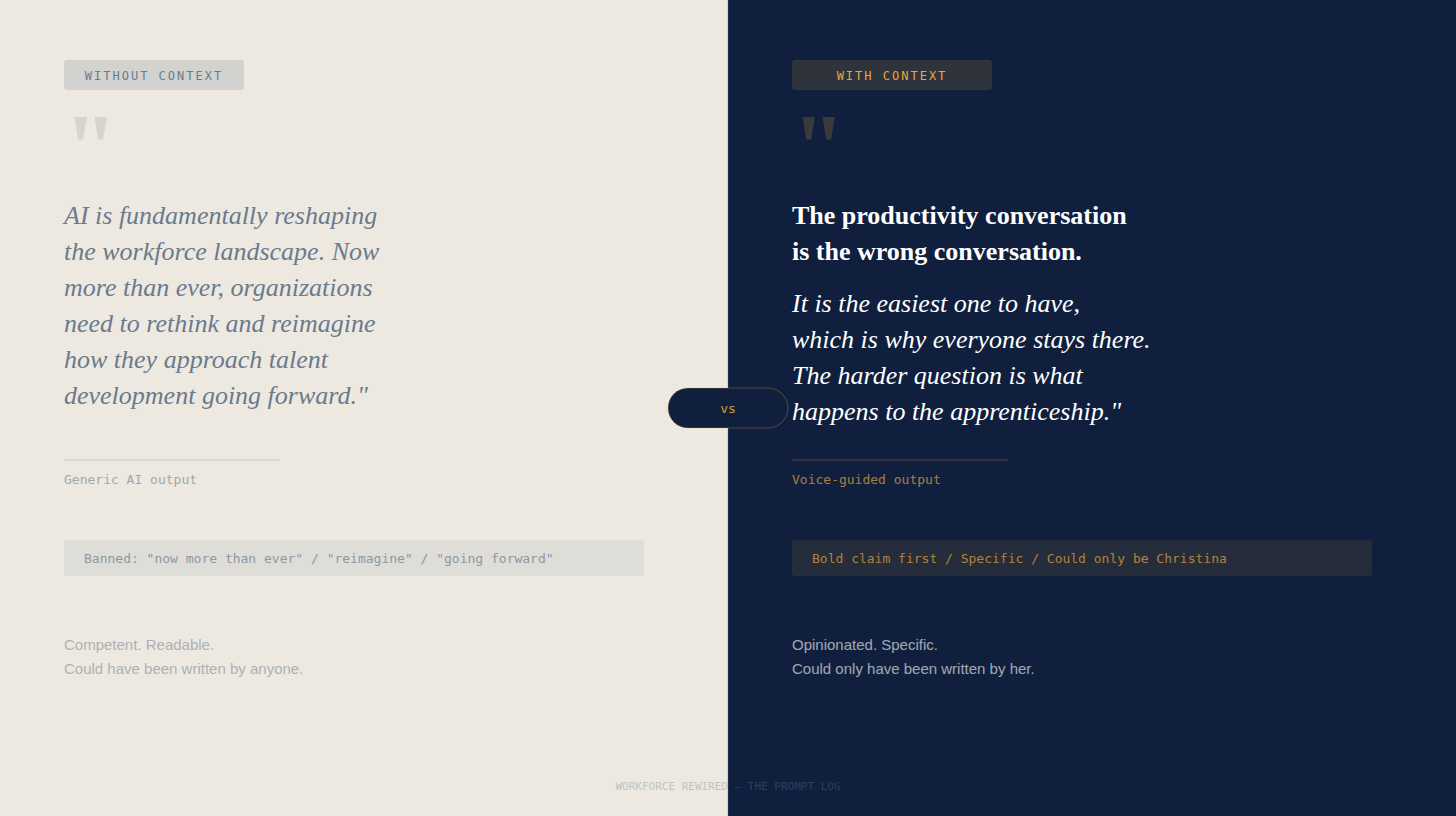
That’s the real value. Not replacement. Translation. An AI that understands your context well enough to help you say what you were going to say anyway, more efficiently, without losing what makes it yours.
I should have done this at launch. I’m glad I did it now.
I’ll keep writing about this process as the project develops: what works, what doesn’t, where the limits are, and where I’m surprised by what’s possible. That’s what this feature is for.
Next in The Prompt Log: The daily briefing system that lands in my inbox every morning with research on AI and workforce trends, and what it took to actually get it working. Spoiler: there were casualties. Multiple agents did not survive the process.
If you found this useful, share it with someone building something they care about.
The Prompt Log is a recurring feature of Workforce Rewired. Published when there’s something honest to say about the process.